
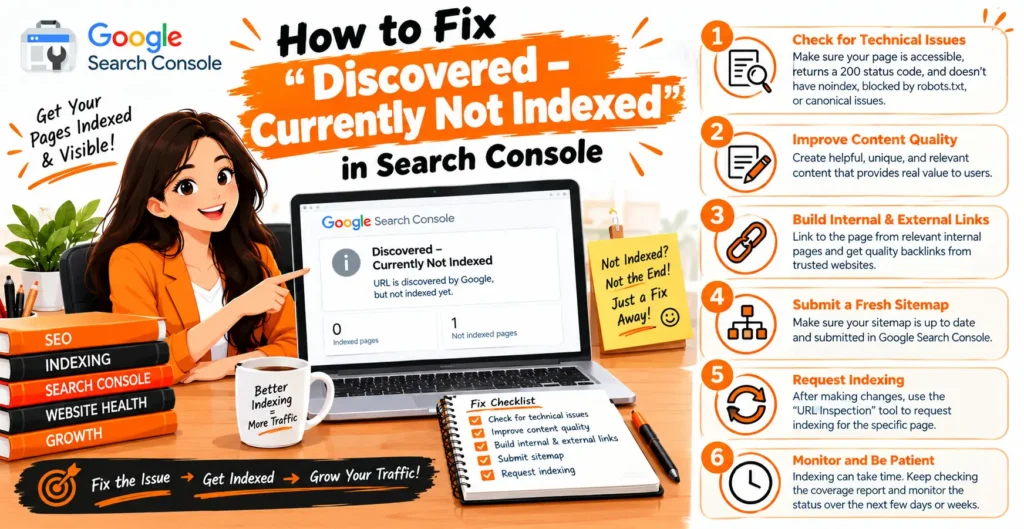
Understanding how to fix discovered currently not indexed in Search Console is essential when your important pages fail to appear in Google search results. This status means Google has discovered your URL but has not crawled it yet.
The problem may relate to crawl budget, weak internal linking, server errors, duplicate URLs, or an incorrect sitemap configuration. Fortunately, you can investigate these issues using Google Search Console and practical technical SEO checks.
In this guide, you will learn how to identify crawling problems, improve website structure, optimize URL indexing, and help Google discover valuable content more efficiently. These steps can improve crawlability without guaranteeing indexing.
What Does “Discovered – Currently Not Indexed” Mean?
“Discovered – currently not indexed” is a status shown in Google Search Console’s Page indexing report. It means Google knows that a URL exists but has not crawled it yet, according to the reported status.
Google may postpone crawling when it determines that visiting the URL immediately could overload the website’s server.
This status does not automatically indicate a penalty, a permanent indexing problem, or an error in your content. It means the URL has not progressed through the reported crawling stage.
Your next step is to determine whether Google is simply waiting to crawl the page or whether your website has technical or structural issues that make important URLs harder to process.
Discovered vs. Crawled – Currently Not Indexed
Understanding these two statuses is essential because they describe different stages of Google’s processing workflow. The correct troubleshooting approach depends on whether Google has actually crawled the affected page.
| Feature | Discovered – Currently Not Indexed | Crawled – Currently Not Indexed |
| URL discovered by Google | Yes | Yes |
| Page crawled | Not yet, according to the status | Yes |
| Main investigation | Crawl scheduling and accessibility | Content value and indexing signals |
| Initial checks | Server, internal links, URL structure | Content duplication, canonical tags, quality |
| Does a fix guarantee indexing? | No | No |
For discovered URLs, begin by investigating crawlability, server reliability, internal linking, and unnecessary URL variations. For crawled URLs, pay closer attention to content quality, duplication, canonical selection, and whether the page provides sufficient value to searchers.
Why Google Is Not Crawling Your Pages?
Google discovers URLs through internal links, XML sitemaps, external links, and other discovery mechanisms. Discovery does not mean that Google will immediately request every URL. Its crawling systems determine when and how frequently to visit websites based on multiple technical and operational considerations.
A website with weak internal linking, unreliable hosting, excessive URL variations, or many low-value pages may need improvements before important URLs receive the attention you expect.
New websites may also experience delays while Google discovers their structure and establishes a crawling pattern. The first task is to identify the affected URLs and look for a common cause rather than assuming that every page has the same problem.
How to Fix Discovered Currently Not Indexed in Search Console?
The most reliable troubleshooting process starts with evidence. Work through the following steps in order, beginning with URL inspection and basic technical checks before making broader changes to your website.
1. Inspect the URL in Google Search Console
Open Google Search Console, select your website property, and enter the affected URL into the URL Inspection tool. Review the reported indexing status, available crawl information, and any technical issues shown for the page.
Run a live URL test to check whether Google can access the URL at the time of testing. A successful test is useful evidence, but it does not guarantee indexing or confirm every aspect of Google’s indexing decision. Record the results so you can compare them after making changes.
2. Check HTTP Status Codes and Server Reliability
Your important pages should generally return an HTTP 200 response when they are intended to be accessible, rather than an unexpected redirect, timeout, or server error. Repeated 5xx errors, slow responses, and intermittent server failures can interfere with crawling.
Test affected URLs with a browser or an HTTP status checker. If many pages fail simultaneously, investigate hosting resources, server logs, firewall rules, and security configurations.
Resolve the underlying server problem before repeatedly requesting indexing, because Google needs reliable access to crawl the content.
3. Review Robots.txt and Noindex Directives
A robots.txt rule can prevent Googlebot from crawling a URL, while a noindex directive instructs compliant crawlers not to include an accessible page in the index. These controls serve different purposes and should not be confused.
Review your robots.txt file, page-level meta robots tags, and X-Robots-Tag response headers. Make sure important pages are not unintentionally blocked or marked noindex.
If a page is intentionally excluded from search results, do not remove the restriction merely to clear a Search Console status.
4. Verify Canonical Tags and Redirects
Canonical tags help search engines identify the preferred URL among duplicate or similar pages. Inconsistent canonical settings can cause Google to select a different URL from the one you want indexed.
Check that the intended canonical URL is correct, accessible, and consistent with your internal links and sitemap. Inspect redirects to ensure that they lead to the intended destination.
If several URLs serve essentially the same purpose, consolidate them where appropriate instead of attempting to get every duplicate indexed.
5. Strengthen Internal Linking and Fix Orphan Pages
Internal links help Google discover pages and understand their importance within your website. An orphan page, which has no meaningful internal links pointing to it, may be harder for Google to discover through normal site navigation or to prioritize for crawling.
Add relevant contextual links from related articles, category pages, service pages, and other useful sections of your website. Use descriptive anchor text and maintain a logical hierarchy. Do not add links indiscriminately; focus on making your most valuable pages accessible through natural, helpful navigation.
6. Submit and Maintain an Accurate XML Sitemap
An XML sitemap provides search engines with information about URLs you want them to discover. It is especially helpful for new websites, large sites, and websites that publish content frequently. However, sitemap submission does not guarantee that Google will crawl or index every listed URL.
Include preferred canonical URLs that return successful responses and are intended for indexing. Remove redirected, broken, and intentionally excluded URLs where appropriate. Submit the sitemap through Google Search Console and monitor its processing status. For recently updated pages, keep sitemap information accurate, but do not rely on the sitemap as a substitute for internal linking.
7. Improve Content Quality and Reduce Duplicate Pages
Content quality is an important part of a healthy indexing strategy, although the discovered status itself indicates that the page has not yet been crawled according to the report. Websites with large numbers of repetitive, thin, or low-value URLs should assess whether all those pages need to exist.
Make each important page useful, accurate, and distinct from other content on your site. Expand pages that lack meaningful information, consolidate overlapping articles, and remove unnecessary URL variations when appropriate. Avoid rewriting every affected page without evidence. If the technical checks are sound and the URL is valuable, it may simply need more time to be crawled.
8. Optimize Crawl Budget for Large Websites
Crawl budget is particularly relevant to very large websites, frequently updated sites, and websites with extensive URL inventories. Most small websites should investigate basic accessibility and internal linking before focusing on advanced crawl-budget techniques.
If thousands of URLs are affected, review faceted navigation, tracking parameters, duplicate URL patterns, unnecessary redirects, and crawlable search-result pages. Server logs can help reveal how Googlebot spends its crawling activity. Reduce unnecessary URL generation where appropriate and ensure that important pages are reachable without excessive navigation depth.
9. Request Indexing After Fixing the Problem
Once you have corrected the identified issue, use URL Inspection to request indexing for important, eligible pages. This can prompt Google to consider the URL for crawling, but it does not force Google to crawl or index it immediately.
Prioritize key pages instead of repeatedly submitting the same URLs. If an entire directory or template is affected, resolve the shared issue first. An indexing request is a useful follow-up step, not a replacement for correcting technical problems or improving your website’s structure.
10. Monitor Indexing Progress and Recheck Persistent URLs
After making changes, review the Page indexing report and inspect representative URLs again. Google may need time to recrawl the affected pages, so an unchanged status immediately after a fix does not necessarily mean the change was unsuccessful.
If the issue continues, compare affected URLs with pages that Google crawls successfully. Investigate patterns involving page templates, server responses, internal links, canonical settings, and URL parameters. Keep a record of changes and observations so that you can identify which improvements correspond with better crawling outcomes.
How to Diagnose the Problem Based on What You See?
Not every discovered URL requires the same solution. Use the following table to identify your next action based on the evidence available.
| Observed problem | What to investigate | Recommended action |
| Only a few new pages are affected | Crawl scheduling and internal discovery | Check links and allow time for crawling |
| Hundreds of URLs are affected | Sitewide technical or architectural patterns | Group URLs by directory and template |
| Important pages are absent from internal navigation | Orphan pages and link depth | Add relevant internal links |
| Sitemap contains redirected URLs | Sitemap accuracy and canonical URLs | Update the sitemap |
| URLs return 5xx errors | Hosting, firewall, and server capacity | Restore reliable access |
| Google selects another canonical | Duplicate content and canonical consistency | Consolidate or correct URL signals |
| Many parameter-based URLs exist | Crawlable duplicates and URL generation | Reduce unnecessary URL variations |
| Status persists after changes | Whether Google has revisited the URL | Reinspect and monitor crawl information |
The goal is to identify the actual cause, not apply every possible fix. For example, a server problem requires a different response from a page that has no internal links or a URL that duplicates another page.
How to Fix the Issue on WordPress Websites?
WordPress websites can experience indexing problems because of incorrect SEO plugin settings, unnecessary archive pages, conflicting metadata, server instability, or weak internal linking. Start by checking the affected URL in Search Console and verifying that the page is accessible and intended for indexing.
Review your XML sitemap, permalink structure, canonical tags, and robots.txt rules. If you use caching, security, or optimization plugins, confirm that they are not interfering with Googlebot’s access. Make sure important posts and service pages are linked from relevant sections of your site. Avoid changing multiple SEO settings simultaneously, as this makes it harder to identify the cause of a problem.
What to Do When Hundreds of Pages Are Not Indexed?
When a large number of URLs share the same status, investigate the overall website rather than troubleshooting each URL individually. Group affected pages by directory, content type, template, and URL pattern to identify common technical or structural problems.
Review server logs if available, check response codes, examine sitemap quality, and investigate unnecessary URL variations. Prioritize valuable pages and fix issues affecting entire groups of URLs. Once the underlying cause has been addressed, inspect representative pages and monitor the indexing report to see whether Google begins crawling them.
How Long Does Google Take to Index a Page?
There is no fixed timeline for Google to crawl or index a page. Some URLs may be processed relatively quickly, while others may take longer or remain outside the index. Requesting indexing, submitting a sitemap, or improving internal links cannot guarantee a particular outcome.
Instead of relying on a specific number of days, verify that the page is accessible, useful, correctly configured, and connected to your website’s structure. Monitor the available crawl information and revisit persistent issues when new evidence appears. If a large group of pages remains affected, investigate shared causes instead of relying on waiting alone.
Common Mistakes to Avoid
Repeatedly requesting indexing without diagnosing the issue is unlikely to solve an underlying server or site-architecture problem. Building irrelevant backlinks, stuffing keywords into content, or submitting duplicate URLs will not guarantee that Google crawls or indexes your pages.
Avoid removing intentional robots.txt restrictions, changing correct canonical tags, or rewriting useful content simply because the status has not changed yet. Focus on evidence from URL Inspection, server responses, internal links, and the Page indexing report. A systematic approach reduces unnecessary changes and makes troubleshooting more effective.
Frequently Asked Questions
What does “Discovered – Currently Not Indexed” mean?
It means Google has discovered a URL but has not crawled it yet, according to the reported status. The cause may involve crawl scheduling, website accessibility, or the structure of the site’s URLs. Investigate the affected page and look for patterns before deciding which fix is necessary.
How do I fix discovered currently not indexed in Search Console quickly?
Start by inspecting the URL, checking its HTTP response, reviewing robots.txt and indexing directives, and verifying its canonical URL. Then improve relevant internal linking, correct sitemap issues, and request indexing for important pages after resolving any problems. There is no guaranteed instant fix.
Does submitting a sitemap guarantee indexing?
No. A sitemap helps Google discover URLs, but it does not guarantee that the pages will be crawled or indexed. Make sure the sitemap contains the preferred, accessible URLs of pages you want included in search results.
Should I request indexing for every affected URL?
No. Prioritize important, eligible URLs and correct shared technical issues first. Repeatedly submitting the same URL does not guarantee faster crawling or indexing.
Can internal links fix indexing problems?
Relevant internal links can help Google discover pages and understand your website structure. Linking important pages from related content and navigation can improve discovery, but it cannot guarantee indexing.
Does this status mean Google has penalized my website?
No. The status alone does not indicate a manual action or penalty. It reports a crawling state, so you should investigate technical accessibility and crawling patterns before drawing conclusions.
Conclusion
Knowing how to fix discovered currently not indexed in Search Console starts with identifying why Google has not crawled your URL. Check server reliability, robots.txt, canonical tags, internal linking, sitemap accuracy, and unnecessary URL variations before requesting indexing. Improve the value and accessibility of important pages, then monitor crawling progress without expecting a guaranteed timeline. By resolving the underlying issue and prioritizing useful content, you can improve crawlability and give eligible pages a better opportunity to appear in Google Search.

James Robert
James Robert is a seasoned Off-Page SEO expert specializing in strategic link building, digital outreach, and authority growth for businesses aiming to improve search visibility and rankings. With over five years of hands-on experience, he helps brands strengthen their online presence through high-quality backlinks, niche-relevant placements, and ethical SEO practices aligned with Google’s guidelines. James’s core specialties include guest posting, blogger outreach, niche edits, brand mentions, and backlink profile optimization. He is highly skilled at building relationships with authoritative publishers and executing scalable outreach campaigns that drive long-term organic growth. As a contributor to leading marketing platforms, James regularly shares actionable insights on off-page SEO strategies, link acquisition, and sustainable ranking improvements, helping businesses achieve consistent and measurable SEO success.