
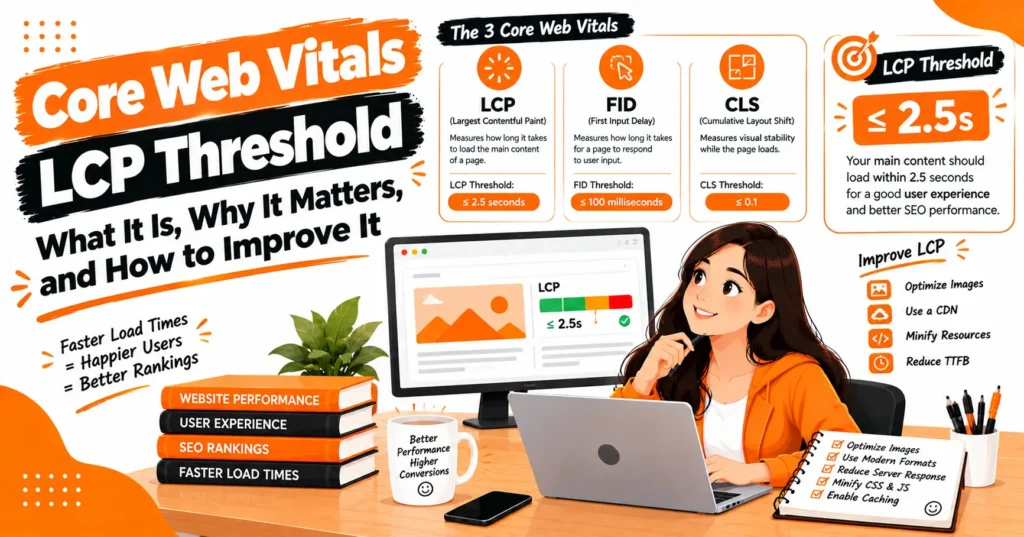
A fast-loading website creates a smoother experience and helps visitors reach important content without unnecessary waiting. The Core Web Vitals LCP Threshold is a key benchmark for evaluating how quickly the largest visible element appears on a page.
Largest Contentful Paint measures the rendering time of prominent content such as a hero image, heading, or large text block.
Google considers an LCP of 2.5 seconds or less a good result, while slower scores may indicate performance problems.
Understanding page performance, the 75th percentile, and LCP optimization can help website owners identify bottlenecks, improve loading speed, and deliver a more reliable experience across mobile and desktop devices while supporting broader technical SEO efforts.
What Is the Largest Contentful Paint?
Largest Contentful Paint, or LCP, is a Core Web Vital that measures loading performance. It focuses on the largest content element visible within the initial viewport as the page loads.
Depending on the page, the LCP element may be a large image, video, heading, paragraph, or another prominent visual element. Because this element often represents the main content users came to see, its rendering time is a useful indicator of perceived loading speed.
What Is the Core Web Vitals LCP Threshold?
The Core Web Vitals LCP Threshold defines the performance ranges used to determine whether a page provides a good loading experience. The thresholds divide LCP results into Good, Needs Improvement, and Poor categories.
| LCP Time | Performance | User Experience |
| 2.5 seconds or less | Good | Fast loading experience |
| More than 2.5 seconds to 4 seconds | Needs Improvement | Performance should be improved |
| More than 4 seconds | Poor | Slow loading experience |
The main target is therefore 2.5 seconds or less. Reaching this threshold consistently is more useful than simply trying to improve a laboratory performance score.
Why Is 2.5 Seconds Considered Good?
The 2.5-second threshold represents a balance between user expectations and what can realistically be achieved across a wide range of websites and devices.
Performance research considers how users perceive waiting time as well as real-world website performance. An extremely strict threshold could be difficult for many sites to achieve, while a very relaxed threshold would not provide a meaningful user-experience target.
This makes 2.5 seconds a practical benchmark for websites that want to provide a strong loading experience.
What Does a Poor LCP Score Mean?
A poor LCP means that the largest visible content element is taking more than four seconds to render. This can happen because the browser is waiting for the server, an important image, CSS, JavaScript, fonts, or other resources.
A poor result does not necessarily mean that every part of the page is slow. One large or delayed element can become the LCP element and significantly affect the metric.
How Does Google Calculate LCP?
LCP is not simply the result of running one speed test. Real-world Core Web Vitals evaluation relies heavily on user experiences collected from actual browsing conditions.
An important concept is the 75th percentile. Instead of relying on an average, performance is assessed based on the experience represented at the 75th percentile. This helps prevent a small number of extremely fast visits from hiding slower experiences.
What Is the 75th Percentile in LCP?
Suppose a page receives LCP measurements from thousands of visitors. The 75th percentile represents the point at which approximately 75% of the measured experiences are at or below that value.
If the 75th-percentile LCP is 2.4 seconds, the result falls within the Good range. If it reaches 2.8 seconds, it moves into Needs Improvement.
This approach makes Core Web Vitals more representative of real users than relying on a simple average.
Mobile and Desktop LCP Are Different
A website can perform very differently on mobile and desktop devices. Mobile visitors may have slower connections, less powerful processors, different screen sizes, and different resource constraints.
For that reason, mobile and desktop performance should be examined separately. A page that achieves an excellent desktop LCP may still have a poor mobile experience if its images, JavaScript, server response, or rendering process are not optimized.
What Counts as an LCP Element?
The LCP element depends on what appears within the user’s initial viewport. Large images are common, particularly hero banners and featured images.
Large text blocks, headings, videos, and other prominent elements can also become the LCP candidate. The browser may update the LCP candidate as larger content becomes available during page loading.
This is why identifying the actual LCP element is one of the first steps in diagnosing a performance problem.
LCP vs FCP: What Is the Difference?
First Contentful Paint (FCP) measures when the first piece of content appears on the screen. LCP measures when the largest meaningful content element becomes visible.
A page can therefore have a fast FCP but a slow LCP. For example, a small heading or loading indicator may appear quickly while a large hero image takes several additional seconds to render.
LCP vs INP vs CLS
Core Web Vitals measure different parts of the user experience. LCP focuses on loading, INP focuses on responsiveness, and CLS focuses on visual stability.
| Metric | Good Threshold | What It Measures |
| LCP | ≤ 2.5 seconds | Loading performance |
| INP | ≤ 200 ms | Interaction responsiveness |
| CLS | ≤ 0.1 | Visual stability |
A website should therefore avoid focusing on LCP alone. A page can load quickly but still provide a poor experience if interactions are delayed or content unexpectedly shifts.
What Causes a High LCP?
High LCP can result from problems occurring at several stages of the loading process. A slow server response can delay the initial HTML, while large resources can delay the rendering of the primary content.
Common technical causes include high TTFB, render-blocking CSS, excessive JavaScript, large images, inefficient fonts, redirects, poor caching, slow hosting, and incorrectly prioritized resources.
How TTFB Affects LCP?
Time to First Byte, commonly called TTFB, measures how long it takes for the browser to receive the first byte of the server response.
When the server responds slowly, the browser has to wait before it can begin processing the page. Improving hosting, caching, database performance, server configuration, and CDN delivery can therefore help reduce delays that contribute to LCP.
How Images Affect LCP?
Images frequently become the largest content element, especially on landing pages and ecommerce websites. An oversized hero image can consume substantial bandwidth and take longer to download and decode.
Image dimensions should match the display requirements, while compression and modern formats can reduce file size. Responsive image techniques can also help deliver an appropriate resource for each device.
The most important above-the-fold image should not automatically be treated like a below-the-fold image. Incorrectly applying lazy loading to the LCP image can delay its discovery and increase LCP.
Should the LCP Image Be Lazy Loaded?
Generally, the main LCP image should be available to the browser as early as possible. Lazy loading is useful for images that are below the initial viewport because those resources do not need to compete with critical content.
Applying lazy loading to the element that becomes LCP can cause an unnecessary delay. The better approach is to prioritize the resource that represents the primary visible content while deferring non-critical images.
How JavaScript Affects LCP?
Heavy JavaScript can consume CPU resources and delay important rendering work. Large scripts may also compete with image downloads, CSS processing, and other browser tasks.
Reducing unused JavaScript, splitting large bundles, delaying non-essential scripts, and preventing unnecessary third-party code from loading early can improve the rendering process.
How CSS Affects LCP?
CSS is necessary for rendering a properly styled page, but large or render-blocking stylesheets can delay the browser’s ability to display important content.
Critical styles should be prioritized while unnecessary CSS should be removed or deferred where appropriate. Reducing CSS overhead can shorten the critical rendering path and help important content appear sooner.
How Fonts Can Delay LCP?
Web fonts can sometimes affect the rendering of large text elements. If the LCP element is a heading or paragraph that depends on a web font, font loading behavior can contribute to the overall rendering time.
Using efficient font files, reducing unnecessary font variants, and selecting appropriate font-display behavior can help prevent typography from becoming a bottleneck.
How Redirects Affect LCP?
Redirects introduce additional network requests before the browser reaches the final page. Multiple redirects can increase the time required to begin loading important resources.
Reducing unnecessary redirects and linking directly to the final destination can remove avoidable delays. This is particularly important when redirects occur before the main HTML document is delivered.
How Hosting and CDN Performance Affect LCP?
Website infrastructure can have a significant impact on loading performance. Slow hosting can increase server response time, while poor caching can force the server to repeatedly generate content unnecessarily.
A properly configured CDN can bring static resources closer to users and reduce network latency. Server-side caching, browser caching, compression, and efficient resource delivery can further improve performance.
How to Improve LCP Below 2.5 Seconds?
Improving LCP should begin with measurement rather than random optimization. First identify the LCP element and determine whether the delay comes from server response, resource loading, or rendering.
Then address the largest bottleneck. Improve TTFB if the server is slow, optimize the LCP image if a large image is responsible, reduce render-blocking resources if CSS is delaying rendering, and reduce JavaScript work when scripting is consuming valuable browser time.
How to Check Your LCP Score?
Performance testing tools can show how quickly a page loads and help identify resources contributing to delays. PageSpeed testing is useful for diagnosing individual URLs and reviewing both laboratory and available real-world performance information.
Search performance reports can also reveal groups of URLs that experience similar Core Web Vitals problems. Browser-based developer tools provide additional information about network requests, rendering activity, resource timing, and the LCP element.
Field Data vs Lab Data
One of the biggest sources of confusion in website performance optimization is the difference between field data and laboratory data.
Field data represents real users experiencing the website across different devices, networks, locations, and browsing conditions. It is valuable for understanding how the website performs in the real world.
Lab data is produced in a controlled testing environment. It is particularly useful for debugging because developers can repeatedly test a page after making changes.
The two numbers do not always match, and that does not necessarily indicate an error. They measure performance under different conditions.
Why Is My LCP Different in Different Tests?
LCP can change depending on the device, network, geographic location, browser, cached resources, server conditions, and page content.
Laboratory tests may use a predefined device and network configuration, while field measurements represent a much wider range of real visitors. This is why optimization should focus on patterns rather than attempting to make every individual test produce exactly the same result.
Does LCP Affect SEO?
Core Web Vitals are part of Google’s broader page experience considerations, but they should not be viewed as an independent ranking shortcut.
A website still needs useful content, strong relevance, good technical accessibility, appropriate internal linking, and other SEO fundamentals. Improving LCP is valuable because it improves the experience of people who visit the website while also helping the site meet an important performance standard.
How to Prioritize LCP Problems?
Not every performance issue deserves the same level of attention. Start with URLs that are classified as Poor and have meaningful traffic or business value.
Next, identify whether the same technical problem affects multiple URLs. Fixing a shared template, theme, server configuration, image component, or script can improve performance across an entire group of pages instead of solving each URL individually.
Common LCP Optimization Mistakes
One common mistake is optimizing for a performance score instead of the actual user experience. A higher laboratory score can be useful, but it does not automatically mean that real visitors have a good LCP.
Another mistake is optimizing every image equally. The LCP element deserves special attention because it directly affects the metric. Similarly, removing useful functionality simply to improve a score can create other usability problems.
A Practical LCP Optimization Workflow
A reliable workflow starts by measuring the page and identifying the LCP element. Next, examine server response time, resource discovery, image loading, CSS, JavaScript, and rendering behavior.
After making a change, test the page again and monitor real-world performance over time. The goal should be sustainable improvement rather than a temporary result from a single controlled test.
LCP Threshold for WordPress Websites
WordPress websites can experience LCP problems because of themes, plugins, page builders, large media files, third-party scripts, and hosting configurations.
A lightweight theme, optimized images, effective caching, carefully selected plugins, efficient hosting, and reduced JavaScript can help. However, optimization should be based on the actual bottleneck rather than installing multiple performance plugins without understanding what they change.
LCP Threshold for Ecommerce Websites
Ecommerce pages often contain large product images, recommendation widgets, tracking scripts, reviews, promotional banners, and dynamic content. These features can compete for browser resources and increase LCP.
The primary product image or promotional hero should be prioritized, while non-essential widgets and below-the-fold resources can be deferred. Optimizing product media and reducing unnecessary third-party scripts can make a substantial difference.
LCP Threshold for Mobile Websites
Mobile optimization deserves special attention because mobile users may have limited bandwidth and less powerful hardware. A page that looks fast on a high-end desktop can feel significantly slower on a mobile connection.
Responsive images, efficient fonts, reduced JavaScript, fast server response, appropriate caching, and careful resource prioritization can help mobile pages reach the Good LCP range.
Frequently Asked Questions
What is a good LCP score?
A good LCP is 2.5 seconds or less. This means the largest visible content element is rendered within the recommended loading-performance range.
What is a poor LCP score?
An LCP above 4 seconds is considered Poor. Results between more than 2.5 and 4 seconds fall into the Needs Improvement range.
What is the ideal LCP?
For Core Web Vitals, the recommended target is 2.5 seconds or less. In practice, achieving an even faster LCP can provide additional performance headroom, especially for visitors using slower devices or networks.
How do I reduce LCP?
Start by identifying the LCP element. Then optimize the server response, LCP resource, image size, CSS, JavaScript, fonts, caching, and network delivery based on the specific bottleneck.
Why is my LCP above 4 seconds?
Common reasons include slow TTFB, large hero images, render-blocking resources, excessive JavaScript, inefficient hosting, redirects, and poor resource prioritization.
Conclusion
The Core Web Vitals LCP Threshold provides a clear benchmark for loading performance: aim for an LCP of 2.5 seconds or less. Understanding the 75th percentile, identifying the actual LCP element, separating field data from lab data, and optimizing server response, images, CSS, JavaScript, fonts, and resource delivery can significantly improve performance. Treat LCP as part of a complete technical SEO and user-experience strategy rather than as a standalone ranking factor.

James Robert
James Robert is a seasoned Off-Page SEO expert specializing in strategic link building, digital outreach, and authority growth for businesses aiming to improve search visibility and rankings. With over five years of hands-on experience, he helps brands strengthen their online presence through high-quality backlinks, niche-relevant placements, and ethical SEO practices aligned with Google’s guidelines. James’s core specialties include guest posting, blogger outreach, niche edits, brand mentions, and backlink profile optimization. He is highly skilled at building relationships with authoritative publishers and executing scalable outreach campaigns that drive long-term organic growth. As a contributor to leading marketing platforms, James regularly shares actionable insights on off-page SEO strategies, link acquisition, and sustainable ranking improvements, helping businesses achieve consistent and measurable SEO success.